
You may have heard that Google Analytics is a powerful tool for gaining insights about your website and digital marketing strategies. But what does Google Analytics for nonprofits actually look like in practice?
Google Analytics 4 (GA4) is Google’s current analytics platform. It helps organizations understand how people find their website, what they do once they arrive, and which pages or campaigns lead to meaningful actions like donations, email signups, or event registrations.
For nonprofits, this kind of insight can be incredibly helpful. When you understand how people interact with your website, you can make smarter decisions about your content, fundraising campaigns, and outreach strategies.
In this guide, we’ll walk through the basics of Google Analytics for nonprofits and explain how to use GA4 data to improve your website and digital marketing.
- Google Analytics for Nonprofits: An Overview
- Putting Google Analytics to Work for Your Nonprofit
- Other Google Products Your Nonprofit Can Use to Succeed
- How Cornershop Creative Leverages Google Analytics for Nonprofits
Google Analytics for Nonprofits: An Overview
GA4 is a robust tool that provides a wealth of information about who visits your nonprofit website and what they do once they land there. But most importantly, it is easy to use, customizable, and allows for real-time, automated data collection. Let’s explore the fundamentals of this platform.
What is Google Analytics?
Google Analytics is a data collection and analysis tool. When connected to your organization’s website, it collects information about the people who visit your site, including things like the channels and sources that they come from, the pages that they view, and the actions that they take on your site.
Within the tool, all of this website data is available to see in tables or line graphs, and you’re able to use filters to dig down into numbers about more specific facets of your audience. For example, you could see what pages donors viewed before making a donation.
How can Google Analytics help nonprofits?
Google Analytics can provide insight into the demographics of your nonprofit website’s visitors and how to optimize your site for them. More specifically:
- It enables you to set and track goals for your website.
- It helps you understand how effective your online marketing and fundraising efforts are.
- It empowers you to make data-driven decisions to effectively maintain your website.
- It helps you measure ROI.
- It’s a free tool!
Understanding Google Analytics Terminology
Half the battle in becoming acquainted with Google Analytics is learning the terminology. Once you’ve mastered certain metric names and what they mean, you’ll be able to more easily navigate and understand your nonprofit’s Google Analytics dashboard. Here is a quick glossary of the ones you’ll find most helpful (or check out this much more comprehensive glossary):
- Dimensions: These are attributes or characteristics of your users and their interactions with your site. Examples include Country, Device, Page Title, and Landing Page.
- Metrics: Similarly, metrics are individual elements of a dimension that can be measured as sums or ratios. Examples include Pageviews, Users, Sessions, and Engagement Rate.
- Events: This refers to custom interactions (or attributes) on your website. Examples include, tracking plays of an embedded video or clicks on a link.
- Key Events: Key events measure how often users take the most important actions (or events) on your website. Examples include making a donation, subscribing to your email newsletter, or registering as a member.
Goal setting through key event measurement is one of the most helpful ways to use Google Analytics beyond its many built-in tracking tools, because it allows you to prioritize actions that align with your specific mission.
Universal Analytics vs. Google Analytics 4
Earlier versions of Google Analytics looked very different from the tool nonprofits use today. Google retired Universal Analytics in July 2023, making Google Analytics 4 (GA4) the standard analytics platform going forward.
GA4 introduced several important changes:
- It focuses on events instead of sessions.
- It allows organizations to track websites and apps in the same property.
- It provides stronger privacy protections and consent tools.
- It includes more flexible reporting and exploration tools.
Instead of measuring activity primarily through pageviews and sessions, GA4 tracks individual interactions, such as:
- Clicks
- Form submissions
- Video views
- Purchases (or donations!)
This event-based model gives nonprofits a clearer view of how supporters interact with their websites across multiple visits.
Putting Google Analytics to Work for Your Nonprofit
As with any digital tool, the first step is to sign up, after which you can customize your GA4 setup to prioritize your organization’s most important goals.
How to Get Started with Google Analytics for Your Nonprofit
To get started, create your Google Analytics 4 property, take your account structure into consideration, and follow the Setup Assistant to build out your account.
Once that initial setup process is done, there are a few customizations you can make to increase the value of the data within GA4 for your organization:
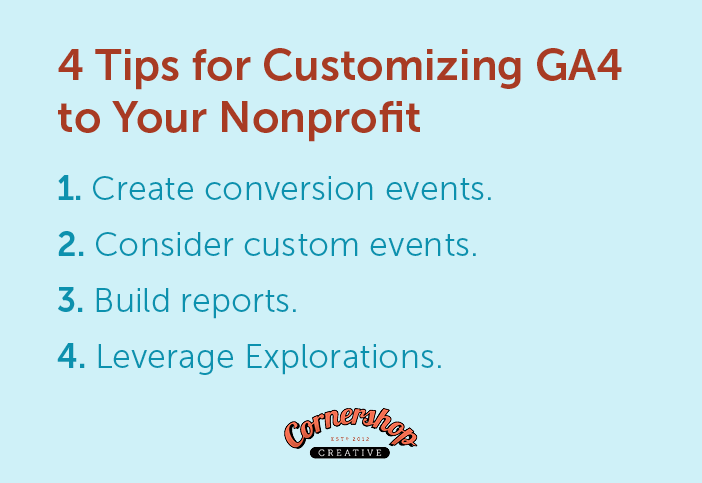
- Create key events: Similar to goals in Universal Analytics, GA4 uses key events to provide additional insights on the most important actions on your website. Create key events around those most important goals like donations, event registrations, or email sign-ups.
- Consider custom events: GA4 automatically collects information about many potential user actions on your website like page views, clicks, and scrolls, but these may not include every single action that you’ll want data on. Create custom events for less common actions unique to your website, like clicks on a call to action or navigation menu button.
- Build reports: There are common reports available, but the Report Builder allows you to create custom reports with all of the dimensions and metrics that you care most about.
- Leverage Explorations: Explorations allow you to gain deeper insights into users and their journeys with customizable data views and endless segmentation possibilities.
The sky’s the limit when it comes to customizing your organization’s data in GA4, empowering you to base your strategies on real results.
For example, you could create a key event for donations to your annual appeal donation form and custom events for views and form starts of that specific form. An Exploration could then show an easily digestible picture of your full annual appeal campaign, including information about supporters who donated and those who saw the form and began filling it out, but ultimately opted not to give.
Helpful Pre-Built Reports in GA4 for Nonprofits
GA4 includes many customizable reporting tools, but you don’t need to build complex dashboards to start learning from your data. Some of the most useful insights for nonprofits come from GA4’s pre-built reports.
Here are a few reports we recommend checking regularly.
Traffic Acquisition Report
One of the most helpful reports in GA4 is the Traffic Acquisition report. You can find it under: Reports → Acquisition → Traffic acquisition.
This report shows how visitors are finding your website. It breaks traffic down by channel, including organic search, direct traffic, email, social media, paid ads, and referral traffic from other websites.
For nonprofits, this report can answer important questions like:
- Are people finding our site through Google search?
- Are our email campaigns driving website traffic?
- Are social media posts bringing visitors to our donation page?
- Which marketing channels lead to the most engaged visitors?
For example, you might discover that organic search brings the most visitors, email campaigns bring the most donors, and social media drives event registrations. Insights like these can help your team decide where to focus its marketing efforts.
Pages and Screens Report
Another report nonprofits should review regularly is the Pages and Screens report. You can find it under: Reports → Engagement → Pages and screens
This report shows which pages on your website receive the most attention and how visitors interact with those pages. Important metrics include views, users, engagement rate, average engagement time, and key events.
This report can help answer questions like:
- Which blog posts are attracting the most visitors?
- Are people spending time on our program pages?
- Which landing pages drive donations or email signups?
- Are visitors dropping off before reaching our donation form?
If you notice that certain pages attract a lot of traffic, you might decide to:
- Add clearer calls to action
- Highlight related content
- Improve content to guide users toward your site’s most important actions
The Pages and Screens report is a great place to start when you want to understand what content is resonating with your audience.
Using Insights from Google Analytics to Improve Your Site: 4 Tips
There are plenty of insights you can gain from Google Analytics to steer your marketing strategies and improve your site your visitors:
- Make your site more engaging: Look for pages with low engagement rates and improve them with clearer headings, stronger visuals, or more compelling calls to action.
- Strengthen your SEO strategy: Review which pages attract visitors from search engines like Google. High-performing pages can guide future content topics and keyword strategies.
- Optimize landing pages: Identify which pages drive key events like donations or email signups and apply similar design patterns to other important pages.
- Improve donation flows: If you track donation events, GA4 can help you understand where supporters enter and exit your donation process so you can reduce friction.
Essentially, if you have a question about your website that can be answered with data—from “How many people actually use this tool we put so much time into?” to “How did the campaign promotion go?”—Google Analytics can help you answer it.
Other Google Products Your Nonprofit Can Use to Succeed
Aside from Google Analytics, there are other Google products that your organization can use to move your digital marketing (and mission!) forward. And since these tools are all freely available through Google, they can be integrated with your website and Google Analytics property to work together and make the most of your efforts within each individual tool.
- Google for Nonprofits: The Google for Nonprofits program gives you access to a variety of paid Google products for free! That includes the Ad Grant (discussed below), Google Workspace, the YouTube Nonprofit Program, and Google Maps credits.
- Google Search Console: A powerful tool for SEO, Google Search Console helps you monitor your website performance and fix issues that could hinder your ranking in search results.
- Looker Studio: When connected to your Google Analytics account, Looker Studio allows you to build reports with custom data visualizations to help all of your stakeholders better understand website and marketing results. Create charts and graphs to your heart’s content!
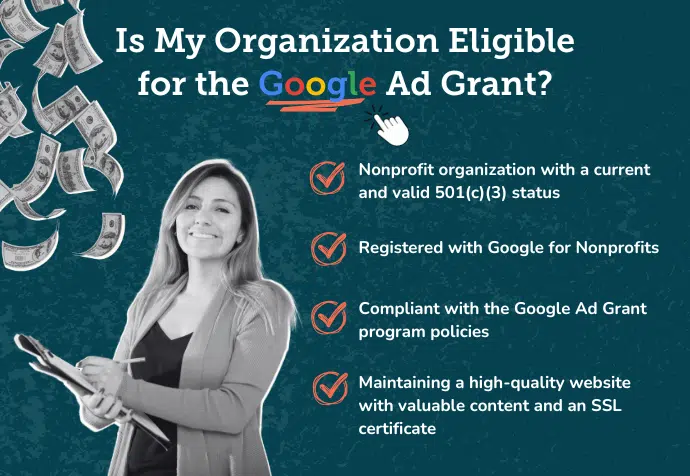
- Google Ad Grant: The Google Ad Grant provides your organization with a free $10,000 monthly ads budget for Google search and performance max ads. According to our guide on the Google Ad Grant, you can use it to spread your reach and advertise your organization within popular search results, but you need to meet eligibility requirements like having a valid 501(c)(3) status, registering with Google for Nonprofits, complying with the program’s policies, and having a high-quality website.
Beyond Google’s own tools and programs, aim to connect as many of the tools that your organization uses for marketing and communications purposes to your nonprofit’s Google Analytics account to streamline and organize all of your data. You can learn more about what’s possible with Google Analytics integrations.
How Cornershop Creative Leverages Google Analytics for Nonprofits
Need some help making the most of Google Analytics on your nonprofit website? So much is possible with Google Analytics, but it all depends on setting up your account in a way that prioritizes your nonprofit’s most important goals.
If you’re feeling intimidated by the setup process, our team can help you strategize and implement a Google Analytics setup to easily find answers to your wildest data questions.
And after the setup process is complete, our team can also step in to prepare reports, analyze results and make website recommendations based on those results.
If you want to use data to inform your nonprofit’s strategies, we can help you do that with Google Analytics.
Additional Resources for Nonprofits Using GA4
Google Analytics can be a bit intimidating at first, but spending some time learning about the tools and techniques to get the most out of it is time well spent. There are many trainings out there, but Google Analytics offers its own free Analytics Academy that goes over all the basics you’ll need. Plus, they have an advanced course to help you become a pro!
By following the tips outlined in this guide, you’ll be well on your way to not only getting Google Analytics up and running on your site but also using that data to help identify improvements you can make to your site to increase traffic and engagement from your users.
To learn more about how you can improve your nonprofit’s website with data, check out these resources:
- Top Nonprofit Web Design Companies To Boost Your Reach. Working with a nonprofit-specific web design company can help you unleash the power of your organization’s site. Get our recommendations and tips here.
- SEO For Nonprofits: A Playbook to Greater Organic Visibility. Learn about the importance and power of search engine optimization (SEO) for reaching more of your target audience and get 10 tips for optimizing your website for searchers.
- 15+ Nonprofit Web Design Best Practices to Drive Support. Is your Analytics data telling you about design issues? Use these design best practices to catch and keep your supporters’ attention.