Owning a website is similar to owning a car: regular and preventive maintenance is required to ensure it’s secure, reliable, and stable.
Though nonprofit website maintenance isn’t the most exciting work (unless you’re a web designer!), it’s incredibly important for the longevity and strategic value of your website. Without it, you risk eroding the trust of your audience and losing the donations that fuel your cause. A well-maintained site, on the other hand, becomes a powerful and reliable engine for your mission.
In this guide, we’ll cover everything you need to know about maintaining and updating your nonprofit website:
- Website Maintenance for Nonprofits: FAQ
- Our FREE Nonprofit Website Maintenance Plan
- Smart Website Maintenance Tips for Nonprofit Organizations
- How Cornershop Creative Helps Maintain Your Nonprofit’s Website
Your website is a powerful tool for your marketing and fundraising efforts, but it requires regular care to work effectively. Understanding the fundamentals of website maintenance is the first step to unlocking its full potential, so let’s start with some foundational information.
Website Maintenance for Nonprofits: FAQ
What is nonprofit website maintenance?
Nonprofit website maintenance, sometimes called website management, is the process of monitoring your website’s performance and making regular updates to keep the site secure, user-friendly, and helpful. It involves making regular technical updates to ensure it’s safe and functional, as well as refreshing content to feature accurate mission information and success stories.
Key tasks associated with maintaining a nonprofit website include:
- Updating software and plugins on open-source platforms like WordPress to patch security holes and improve functionality.
- Performing regular site backups to prevent the loss of data in case of a crash or security breach.
- Running security scans to check for malware and vulnerabilities.
- Testing key functions, such as donation forms and contact pages, to ensure they are working correctly.
- Checking for and fixing broken links to improve user experience and search engine optimization (SEO).
- Refreshing content to include accurate mission information, recent impact stories, and up-to-date branding.
In short, proactive care prevents small issues from becoming major problems. It ensures your online presence remains secure and professional at all times.
Why is careful nonprofit website maintenance important for your site’s health?
Your nonprofit website’s health depends on consistent care to keep up with both shifting organizational needs and external security threats. Without it, your site can quickly become a liability that harms your mission instead of helping it. Plus, it’s a lot less stressful to perform regular nonprofit website maintenance than it is to deal with outages, site slowness, hacking, or site errors.
To get more specific, keeping your site updated matters for:
- Security: Protecting your website is the most important reason for keeping everything updated. For instance, let’s say the WordPress core or a plugin needs a security patch or bug fix. If you don’t make these updates promptly, your site could get hacked or simply break, leaving critical functions like donation forms unusable and eroding the trust you’ve built with your audience.
- Stability and Reliability: Updates ensure your website runs on the latest, most stable code. This prevents compatibility issues, server outages, and unexpected crashes, providing a reliable and professional experience for every visitor. An older, unstable site runs more slowly and is more likely to fail when you need it most.
- Relevance: Website maintenance is also about providing current and compelling information. If your website content is outdated and doesn’t reflect your organization’s dynamic work, then visitors and potential donors will be less likely to engage with your cause.
Essentially, consistent maintenance keeps your digital front door secure, professional, and ready to support your mission!
What are the benefits of maintaining a high-quality nonprofit website?
There are a few obvious benefits to having a website that works and looks great. For one, more visitors will stay on your site for longer periods of time and take actions to support your work.
Plus, managing your website proactively gives your team confidence to rely on your site for important marketing and fundraising tasks. In other words, when you know that your website is working well consistently, you can strategically use it to advance your mission.
Here are just a few things a well-maintained website can help you do:
- Spread awareness of your mission and vision
- Launch online fundraising campaigns and collect donations
- Promote your events and get attendees registered
- Recognize your donors, volunteers, sponsors, and corporate partners
A well-maintained website also unlocks new opportunities to expand your reach. For example, search engines boost reliable, fast-loading sites in their rankings, making maintenance crucial for your SEO. It’s also a strict requirement for keeping the Google Ad Grant, which depends on a high-quality user experience.
How often do you need to check up on your nonprofit’s website?
There’s no hard and fast rule for how often you should engage in website maintenance tasks. Some organizations like to schedule weekly, monthly, quarterly, and annual tasks to space things out and have a regular touchpoint with their website.
The important thing is to make a schedule that works for you and stick to it. Otherwise, you may find that your website management work always gets pushed to the back burner!
To make things easier, you may want to have an experienced expert perform updates and upgrades for you. More on this below!
Our FREE Website Maintenance Plan
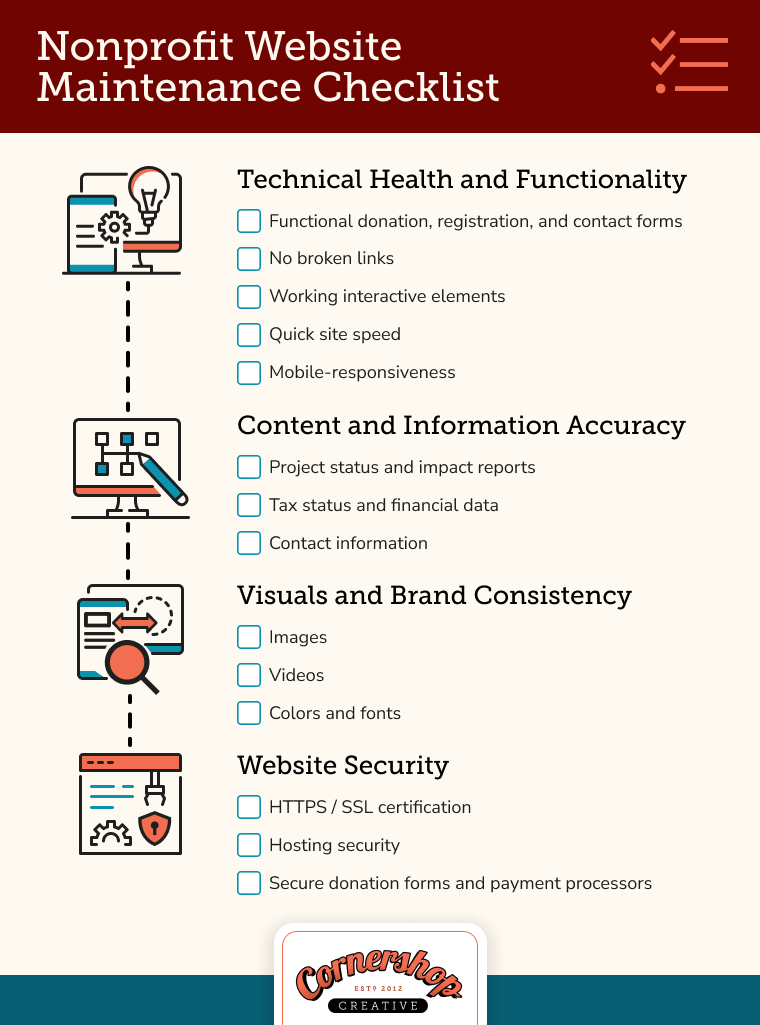
A healthy website requires a consistent plan, not a last-minute scramble. Use the following nonprofit website maintenance checklist to simplify the process and empower your team to work through your site in a methodical, proactive way.
We’ve organized it into four key categories:
- Technical Health and Functionality
- Content and Information Accuracy
- Visuals and Brand Consistency
- Website Security
1. Technical Health and Functionality
It’s important to regularly check your website to ensure everything is functioning properly, especially after upgrades.
You can conduct this type of review manually, or you can program it through unit tests and other testing platforms. For example, we like the platform Ghost Inspector, which can create automated tests on your website.
Let’s look at some key elements that should always function properly.
Test All Donation, Registration, and Contact Forms.
Forms are the lifeblood of your website. If users cannot complete forms to donate, register for events, or contact you, you will lose valuable supporters.
We encourage you to regularly test all forms on the website to ensure that:
- Forms display correctly
- Information can be submitted
- All notifications and confirmations work as expected
- Any integrations with third-party CRMs work correctly
Check for Broken Links.
While it’s often easy to identify when a menu isn’t working correctly, it’s harder to know when links are broken on menus and elsewhere on the site.
As a site grows and evolves, the content will grow and evolve with it. Often, links and pages need to change and are no longer relevant to your site. When you remove a page from the site, it can create a 404 link.
404 errors are bad for both the user experience and SEO, as they tell search engines that your site is not being maintained. We recommend two WordPress plugins to address this problem:
- Broken Link Checker. This is a plugin for WordPress that identifies broken links on the website. While it does a fantastic job, it is very resource-intensive and can slow down your site. We recommend that you activate this plugin only when you’re using it to remove broken links. Alternatively, there are a variety of free broken link scanners such as Dr. Link Check, Broken Link Checker, and Dead Link Checker. These don’t run on your WordPress site.
- Yoast SEO Premium. Yoast SEO is a popular WordPress plugin that lets you configure your site to be more SEO-friendly. One of the many amazing features of the premium version is that it will automatically create redirects any time you change a page URL. This plugin ensures that you don’t have broken links by fixing them before they become a problem.
Verify that Interactive Elements Work.
Interactive elements, such as videos, animations, maps, and online forums, are among the most common breakage culprits during nonprofit website maintenance updates, and they’re easy to overlook.
Setting a regular schedule for checking these interactive elements is key. When possible, automate unit tests or use a platform like Ghost Inspector to ensure everything functions.
This also goes for third-party tools, like Google Maps. Several years ago, Google began requiring a valid billing account (with a credit card on file) for its Maps Platform to work on public websites. If your API key is not linked to an active billing account, your map will display an error, making it unusable for visitors.
Monitor Site Speed.
A slow website can frustrate potential donors and cause them to leave before taking action. It also negatively impacts your search engine rankings and can even put your Google Ad Grant at risk, as Google prioritizes fast, user-friendly sites.
Take the following steps to ensure things load quickly:
- Compress images. Large image files are the most common cause of slow pages. Use an online tool like TinyPNG to reduce image file sizes before uploading.
- Remove duplicate images from your media library. Periodically delete old or unused images to save server space and keep your assets organized. Our Media Deduper plugin for WordPress can streamline this process.
- Embed videos. Never host videos directly on your site. Always embed them from a third-party platform like YouTube or Vimeo to reduce the load on your server.
- Use caching. A caching plugin (like WP Rocket or W3 Total Cache for WordPress) saves static versions of your pages, allowing them to load much faster for visitors.
You can use a free tool like Google PageSpeed Insights to measure your site’s load time and get specific recommendations for improvement.
Ensure Mobile Responsiveness.
57% of nonprofit website traffic comes from mobile devices, so make sure your nonprofit’s site functions on smartphones and tablets. After making updates, always check key pages like your donation form and event calendar on a phone to verify that:
- Content reformats to fit different screen sizes.
- Text and images are readable.
- Buttons are clickable.
- Menus work correctly.
A poor mobile experience can be a major barrier to engagement and donations, so this simple check is one of the most important you can do.
2. Content and Information Accuracy
Your nonprofit’s website could be functioning well, but if your content is outdated, then donors, sponsors, and other supporters will be less likely to engage with your content.
Here are some areas where users expect to see updated content:
Project Status and Impact
The most important thing donors want to know is if your organization (and their donations!) is making an impact. Your content needs to show the donor what you are doing with their money and how it is affecting others for good.
On your website, you can provide regular updates about core programs and projects. Sometimes just a sentence or two about a project’s status can go a long way to ensure that donors know how you’re spending their funds.
Tax Status and Financials (Form 990s)
The often-forgotten tax information is a must for any nonprofit organization. This is often the first stop on a website for donors, foundations, and grant seekers. Delays in providing your 990 information and annual reports to donors can also impact the perceived professionalism and trustworthiness of the organization.
Since tax information can come out anytime, it’s often a good idea to include updates on your 990 page that lets donors know when the next form will be available. This transparency can be really helpful.
Contact Information
We’ve all had the frustrating task of attempting to find contact information on a website, but failing to find the right details. Now imagine you’re a constituent who needs urgent support to help navigate a problem with your nonprofit’s help.
Every website should have a clear and simple path to contact the organization. This should include a contact form and directions on connecting via address and phone number.
If you have multiple offices, list them all. If you have multiple staff that field incoming requests, make sure all those individuals are represented.
3. Visuals and Brand Consistency
A polished visual presentation reinforces your brand’s professionalism. Make sure all visual elements appear correctly. Specifically, take a look at these elements:
Images
Creating images for the modern web is difficult. Visitors might be looking at your site on a seemingly infinite number of screen sizes, which makes it difficult to find images that look great for all users.
Adding images to your website depends a lot on how your theme is built. While you should talk with your developers about your specific image requirements, we often recommend finding images where the focal point is in the center or middle of the image. If the image is then cropped or changed based on the screen size, users will still be able to see the focus on that image.
In addition, you want to ensure that all images contribute to your visual brand or otherwise serve specific purposes.
Videos
As long as you’re embedding videos from a third-party site like YouTube or Vimeo, then you shouldn’t have many issues.
However, we always recommend checking to ensure that all videos are still active. In addition, sometimes embed code from YouTube can include fixed dimensions, which can create a bad experience for mobile visitors.
Colors and Fonts
If multiple people are working on a website together, the branding will inevitably start to shift a bit and move away from its core elements.
When building your website, add guardrails that will prevent other administrators from going off-brand. You can define colors and fonts so only those choices are available to use by others on your team.
If that isn’t possible, create a clear brand guide everyone can reference and build a robust review process to test all new pages before they go live.
4. Website Security
More than any other aspect of nonprofit website maintenance, security is about protecting the trust your supporters and beneficiaries place in you. A vulnerable website doesn’t just expose data; it betrays that trust, putting sensitive donor information at risk and damaging your organization’s reputation.
Verify HTTPS/SSL Certificates.
All websites should have a secure certificate. In addition, your website should enforce SSL, making it impossible for visitors to access the insecure version.
HTTPS is an encryption method that securely connects your site visitor’s browser and your web server. This small change on your website makes it harder for hackers to eavesdrop on the connection.
Nearly all modern hosts offer a free SSL certificate, typically with just a click of a button. To enforce SSL, we recommend you use the Really Simple SSL plugin. This tool does a few simple things, including:
- Checks to ensure there is an SSL certificate
- Sets up WordPress to use HTTPS in URLs
- Sets up redirects from HTTP to HTTPS
- Finds URLs in your content still loading from insecure HTTP sources and attempts to fix them
There are other methods of enforcing SSL via code, but those require developer skills. If you’re interested in that approach, check out this great article from WPBeginner.
Review Hosting Security.
As mentioned, most modern hosting platforms include a free SSL certificate as part of your hosting fees. In many cases, ensuring security is as simple as clicking on a button.
Many hosts provide this, including:
Use Secure Donation Forms and Payment Processors.
Modern payment processors offer excellent security to ensure transaction data is encrypted and safe.
If your donation forms are hosted through a third-party donation management platform, such as Bonterra, Blackbaud, Engaging Networks, Eleo, Bloomerang, DonorBox, ActBlue, or another nonprofit-specific service, then you are already in good shape.
If you use an integrated service, such as PayPal, Authorize.net, or Stripe, ensure that your frontend forms are secure and that data passed through to the processor is done in an encrypted manner.
Most services, like PayPal and Stripe, will now link you directly to their site for processing, instead of allowing you to process on a potentially less secure site. Let’s face it — as much as you can invest in security, PayPal is likely to invest more!
Smart Website Maintenance Tips for Nonprofit Organizations
Now that you have a checklist of what to do, let’s focus on how to make nonprofit website maintenance a seamless part of your operations. The following best practices will help you build a consistent and proactive routine, ensuring your website remains a powerful asset for your mission.
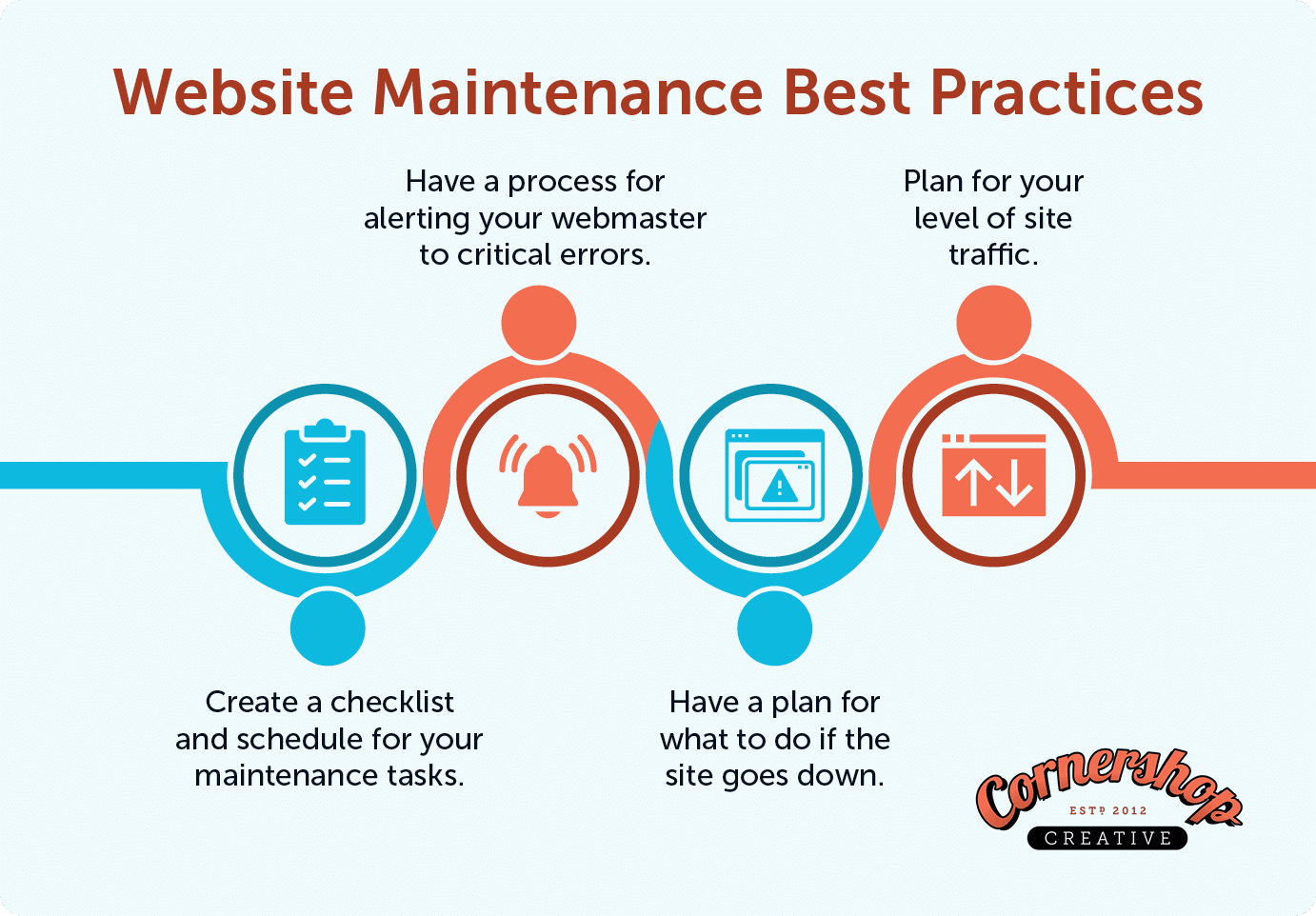
1. Create your nonprofit website maintenance schedule.
If you take on maintenance yourself, you’ll need a plan to turn this large task into a manageable routine. We’re not recommending a full audit of your website every week. However, creating a manageable maintenance schedule will help make sure you’re not missing engagement opportunities or creating poor experiences due to functionality breakages.
Using our checklist as a starting point, build your own schedule:
- Weekly Tasks: These are quick checks that prevent major problems. They include tasks like running site backups, applying critical security updates, and testing your main donation form.
- Monthly Tasks: This is for more thorough health checks. Plan to scan for broken links, check your site speed, and review your security logs.
- Quarterly or Biannual Tasks: Use this time for big-picture strategy. Audit your content for relevance, review user pathways, and perform deeper checks on SEO, mobile responsiveness, and accessibility.
This approach ensures you don’t miss any issues and transforms maintenance from a stressful scramble into a predictable process.
2. Have a process for alerting your webmaster to critical errors.
Websites go down for many reasons, from problems with the hosting server to broken elements on a page. While an outage can be panic-inducing, rest assured that it’s almost always fixable. With the right plan, you can solve the problem quickly with minimal stress.
Some issues may take more time and troubleshooting before they can be fully resolved. If you notice your website goes down repeatedly, keep track of patterns and report these issues to your host or technical support. Here’s what your plan might look like:
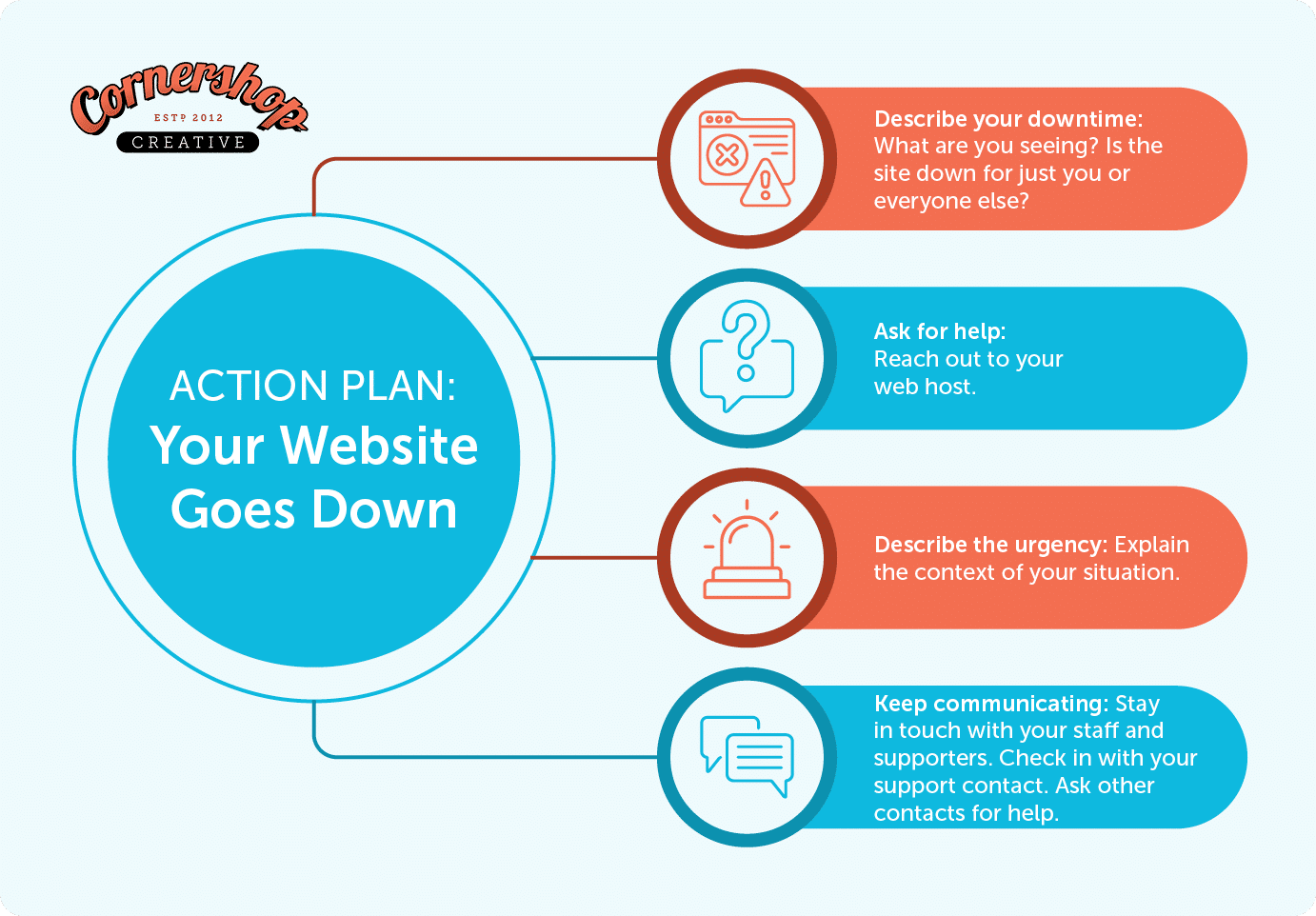
Step 1) Diagnose the problem.
First, document exactly what you see: is it a specific error message or a blank white page? Note any recent plugin or setting changes that could be the cause. Next, confirm the site is down for everyone by checking from another device or asking a colleague to look. If you’re unsure, use a free tool like Down for Everyone or Just Me to rule out an issue with your own network.
Step 2) Ask for help.
If you can’t fix the issue yourself, contact your web host immediately. Most downtime is caused by server issues, which is why reputable hosts offer 24/7 support and should be your first call. If your host can’t solve the problem, consult your list of other technical contacts. This is the fastest way to get the right expert on the case.
Step 3) Describe the urgency.
When you contact support, calmly explain the business impact of the outage. Provide specific context like “We’re in the middle of a fundraising drive,” or “We just sent an email expecting event signups.”
This information helps the support team understand the true urgency and troubleshoot more effectively. Based on the situation, you may be allowed to politely request priority treatment to move your ticket to the top of the queue.
Step 4) Communicate with supporters.
While you wait for a fix, keep your internal team and supporters informed. Before you encounter website issues, create a communications plan that lists who needs to be alerted about website emergencies, including a list of support contacts and backup team members who can help if others are out for the day. Even a one-page document summarizing your process can help during an emergency.
During an outage, keep your team and supporters informed by providing a clear timeline for your next status update. For prolonged downtime, post a brief notice on your social media channels to show you are actively working on a fix. Don’t hesitate to check back in with tech support for progress reports you can share.
4. Prepare your site for expected traffic levels.
High traffic can be both exciting and intimidating. A sudden surge of visitors can bring incredible opportunities, but it can also crash a site that isn’t prepared. To ensure your website can handle the attention, answer these questions:
- Is your site protected? Good attention is one thing, but you want to make sure that you’ve enabled monitoring and security features that help guard against spam traffic, too. Use security plugins like WordFence and services like Sucuri or Cloudflare to monitor your site, block malicious traffic, and protect against attacks.
- Does your web host scale resources based on traffic? Check directly with your web host to understand how they handle traffic spikes. Services like Pantheon and AWS often scale resources automatically, but this is rarely the case with cheaper, shared hosting plans. Confirm your plan’s capabilities before you need them.
- Does your content cache effectively? Proper caching is one of the best ways to handle high traffic. It reduces the load on your server by serving static, saved versions of your pages, allowing your site to stay fast and responsive even with many simultaneous visitors.
- Do you have a constituent relationship management (CRM) system that can handle traffic spikes? Most nonprofits use CRMs like Action Network, ActionKit, Blue State Digital, or Luminate Online to collect donations or petition signatures. Ensure your donation or petition forms submit data directly to their servers, not yours. This offloads the heaviest traffic from your website, preventing your forms from slowing down or crashing your entire site.
- Are you using a Content Delivery Network (CDN) to its fullest potential? A CDN like Cloudflare dramatically speeds up your site by serving assets from servers closer to your visitors. By default, CDNs often only cache images and scripts. Configure your service to also handle other static content to get the full benefit.
How Cornershop Creative Can Help
At Cornershop Creative, we are the trusted web partner for hundreds of world-changing organizations, keeping their sites secure, stable, and high-performing. Let our team manage the technical details of your website, so you can focus on what matters most: your mission.
With the Cornershop support packages, you receive these key nonprofit website maintenance services:
- Regular updates to WordPress and all plugins
- Daily offsite backups
- Uptime and security monitoring
- Visual comparison tool to ensure that updates don’t break the display of your site
- Discounted development rates
Best of all, you get Fast Tasks. With these tasks, you can contact our team with any issues you’re experiencing. We’ll take care of any small bugs or issues on the site, answer your questions, add content, or just be a reliable tech resource for your team.
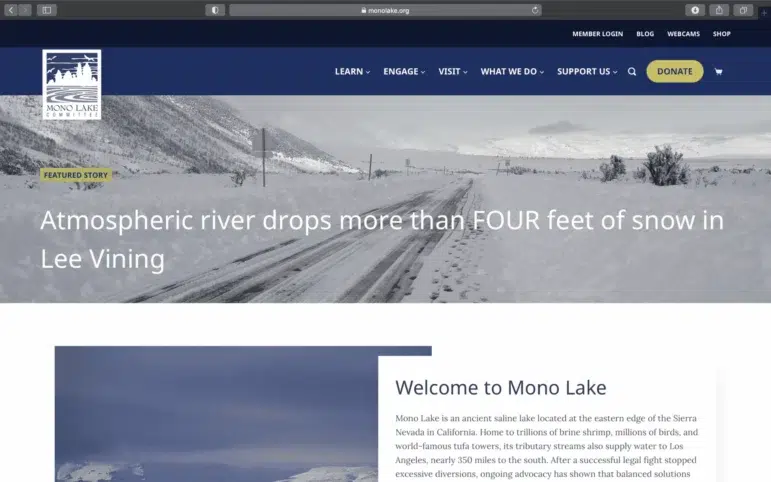
Want to see our work in action? The Mono Lake Committee partnered with us on a Maintenance and Support package to address technical issues without severely impacting their overall website budget. We modernized their fundraising pathway by implementing improved conversion tracking and optimizing their donation forms. This created a faster, more reliable website poised for fundraising growth.
Additional Resources to Enhance Your Nonprofit Website
Nonprofit website maintenance is a big job that’s absolutely necessary for your website to perform well for your supporters. With these tips, you can provide your audience with the best experience and allow them to find the information they are looking for without frustration. And, if you need a hand, we’re always here to help!
Need more tips on nonprofit website management? We have lots! Check out these resources:
- How to Create a Political Campaign Website: Tips & Examples. A campaign website demands peak performance and security from day one. Learn how to design and maintain a strong site that draws attention.
- Top Nonprofit Web Design Companies To Boost Your Reach. Choosing the right partner is crucial for the long-term health of your site. Explore agencies that can build your website and provide the reliable, ongoing maintenance you need post-launch.
- WordPress for Nonprofits: How to Build a Stellar Website. Discover how to build a powerful nonprofit website with the world’s most popular CMS. Explore plugins, themes, and visual builders that will result in a more stable, compelling site.